Unsubscribed

A peer group and course for MSP owners. First cohort starts January 1, 2027.

Build the software your MSP pays for. Then renew add AI.

No AI experience needed. Learn to build your own tools with Claude Code, make them secure, host them safely, and cancel the SaaS you no longer need. Then take the same skills to your clients, as a new line of business you own end to end. In a cohort, with people who are doing the same thing.

> Build a quarterly review deck for each client. Pull ticket stats, device health and backup results from our PSA and RMM. Lock the deck the night before the meeting.
Reading the Autotask and NinjaOne integrations...
Creating src/server/qbr/deck-builder.ts
Adding the nightly lock rule and 14 tests
> Now give the client a portal to see it._

The Resolved story

We were a generic MSP. Then we built our own operating system.

Resolved is a managed service provider in Surrey, BC. This is how one deck tool became the software that runs the company, and why we now teach it.

An MSP owner at a desk with a laptop showing a chart, beside a stack of subscription boxes with one struck out in red
Day one of Claude Code

We were on it from the start

As soon as Claude Code was released, we were experimenting with it: small tools, applets and scripts for our own team. Nothing big. Just useful.

The first real tool

A better quarterly business review

Our CEO, Reid, was not happy with the quality of the tool we used for QBR decks. So he built his own. It loaded service statistics automatically and produced a deck we were proud to present.

The integrations

Building it well meant connecting everything

To make the deck the way we wanted, the tool needed tickets, devices, backups, Microsoft 365 security and contracts. By the time it was done, we had integrations with every system we run.

The portal

Give the clients access

With that much data in one place, the next step was clear: let clients see it. The deck tool became a client portal, with tickets, equipment, reviews, invoices and payments.

Today

An operating system for the whole MSP

Quotes and e-signing, payments and autopay, documentation and passwords, projects, time and billing, standards, training. Every process has a software module, a step-by-step guide and guardrails. It has grown and grown, and we have adopted and adopted.
Bettercustomer experience, because every process is consistent and visible to the client.
Controlover our own processes: a module, a guide and guardrails for each one.
Less SaaSmore than ten thousand dollars a month in subscriptions cancelled, replaced by software we own.

What it looks like

Resolved OS, the tool we built for ourselves.

Screens from our own system, shown with fictional client data. You will not get this software. You will learn to build your own, in the order that pays off first.

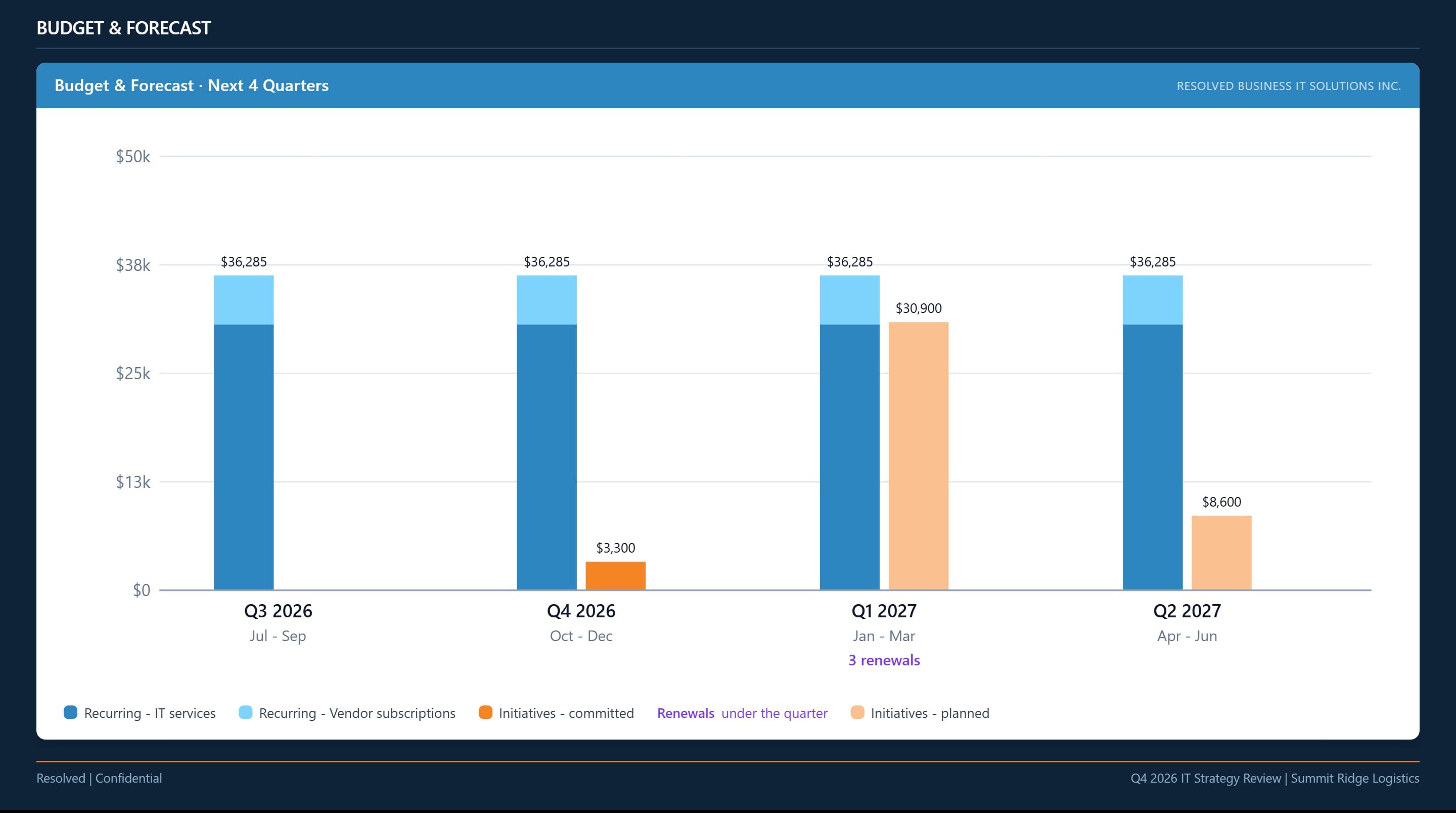
A quarterly review slide: the client's IT budget for the next four quarters as a bar chart
The quarterly review deck. The tool that started it all. Budget, renewals and initiatives, built from live data the night before the meeting.
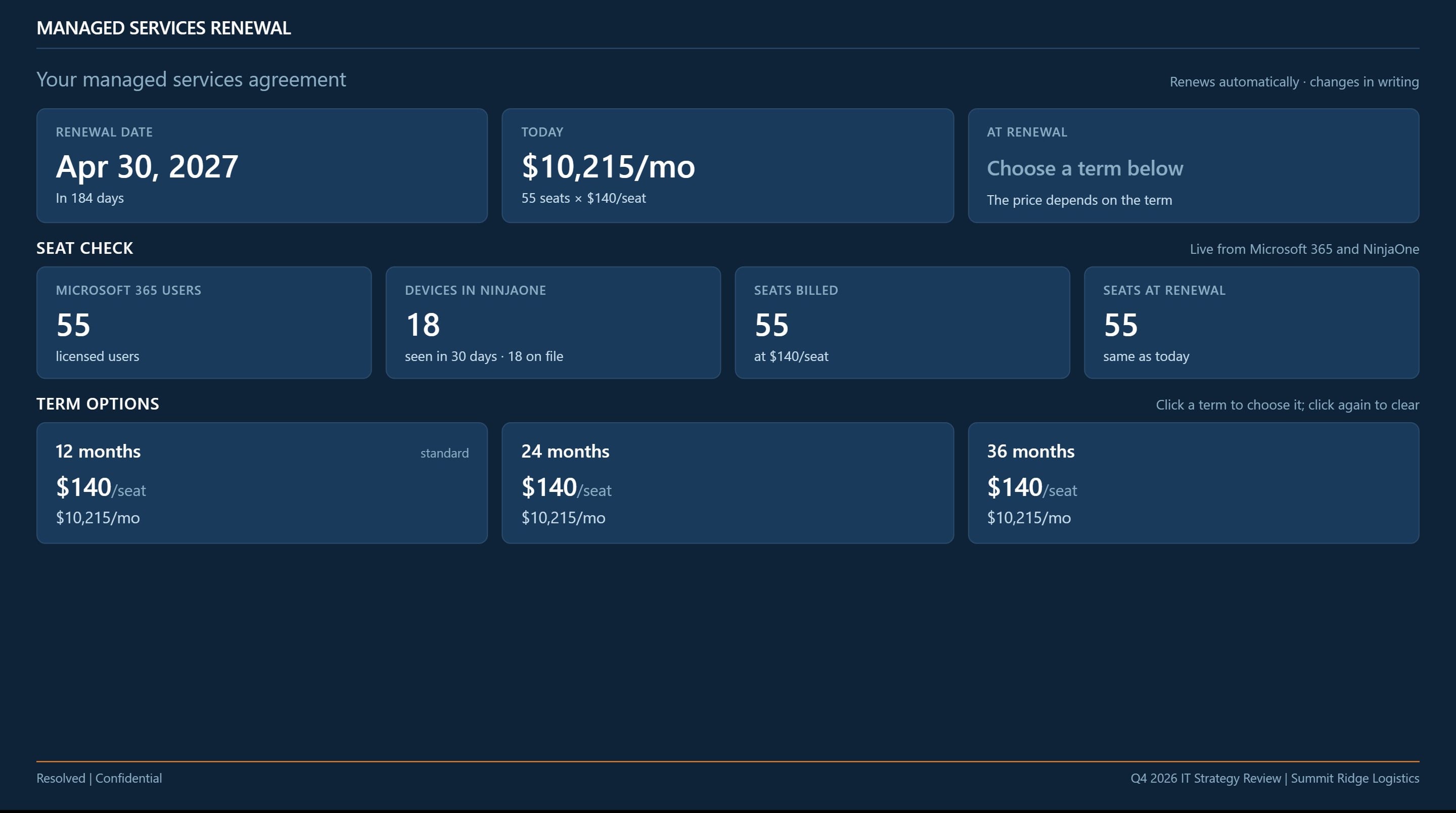
A review slide showing the managed services renewal with a live seat check from Microsoft 365 and NinjaOne
Renewal slide, live seat check. Microsoft 365 users and devices in the RMM, compared with the seats we bill. No spreadsheet.
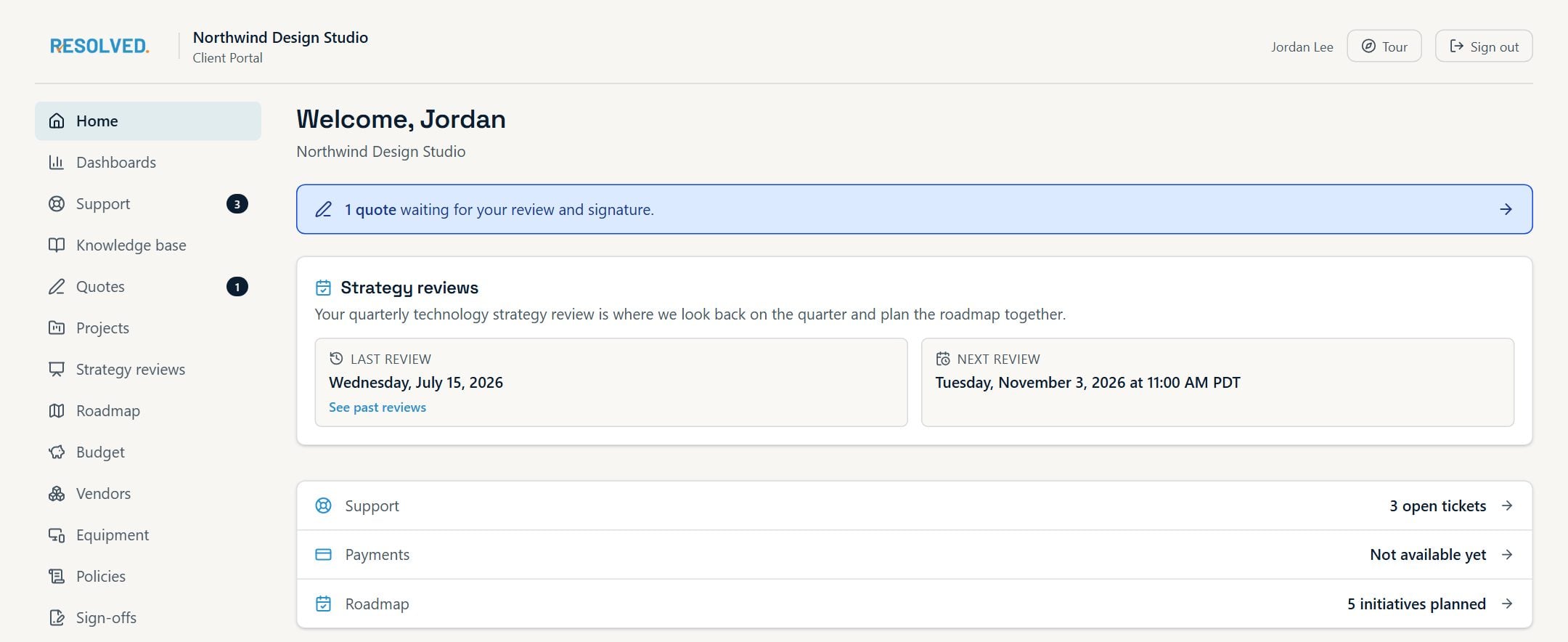
The client portal home page with strategy reviews, open tickets and the roadmap
The client portal. Tickets, reviews, roadmap, budget, equipment, sign-offs and payments. This replaced a SaaS portal we paid for.
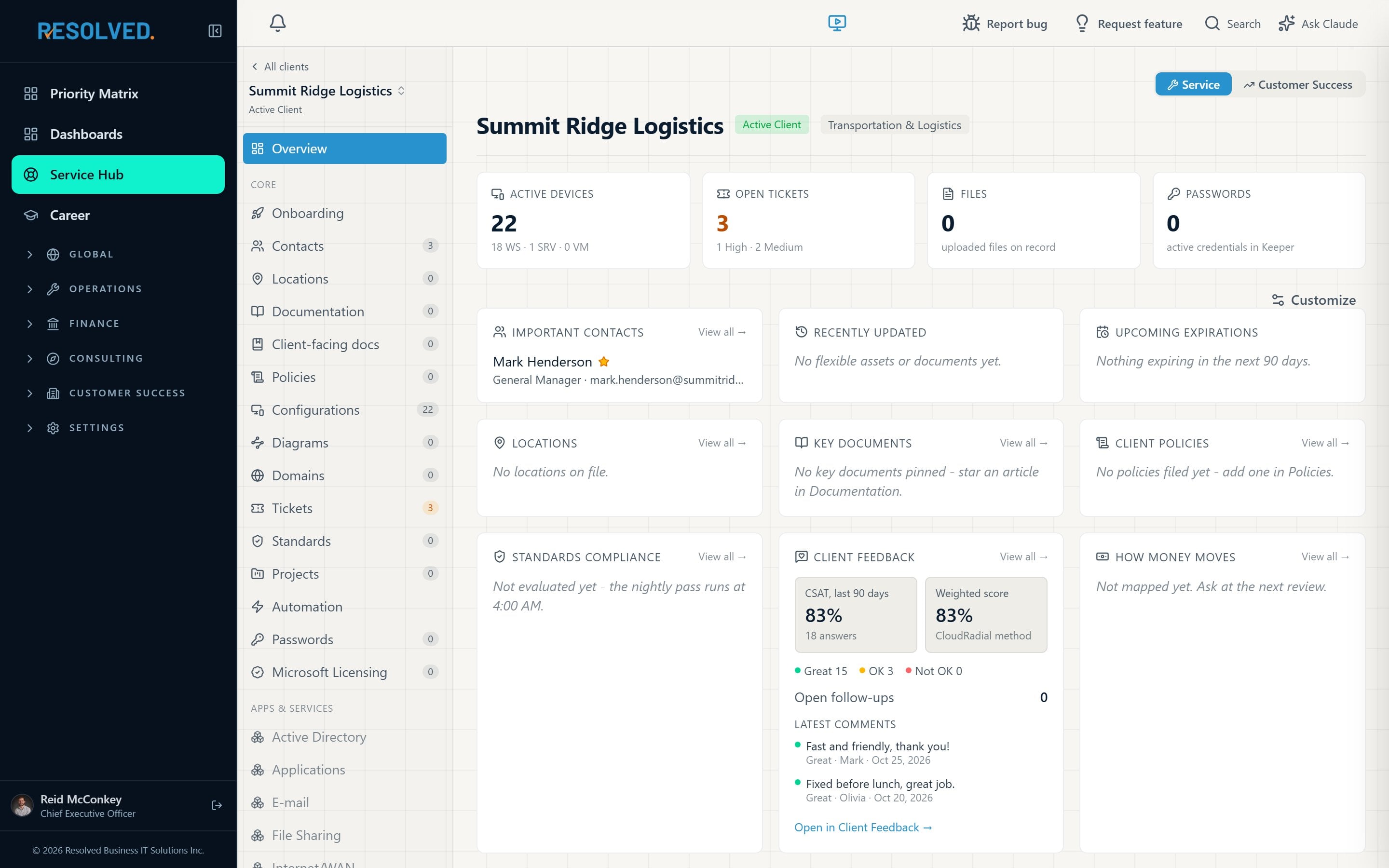
The Service Hub overview for one client: devices, tickets, contacts, feedback
Service Hub. One page per client for the technicians: devices, tickets, passwords, documentation, standards.
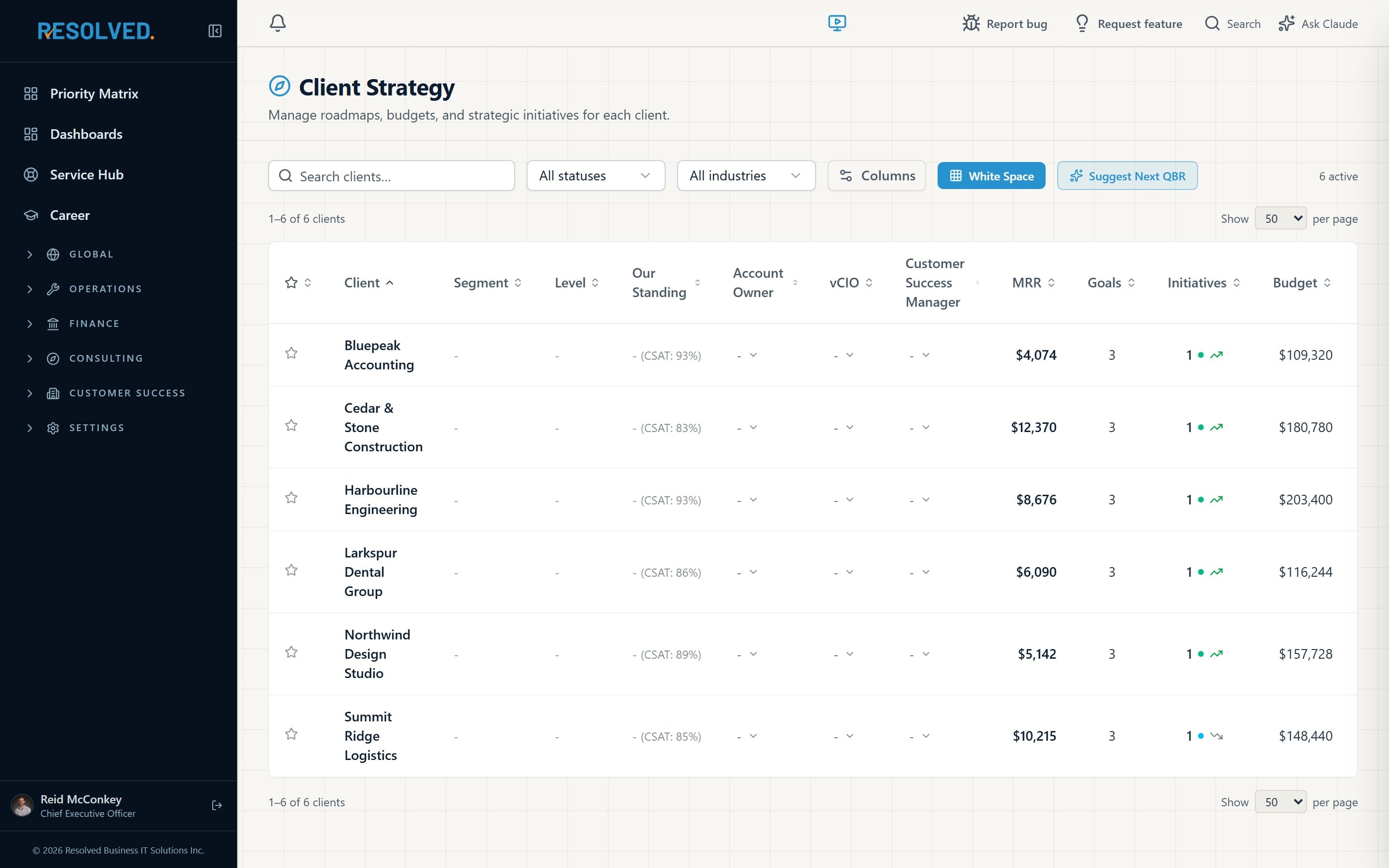
The Client Strategy list with standing, MRR, goals, initiatives and budget per client
Client Strategy. Every client's standing, recurring revenue, goals, initiatives and budget in one list, with the next step for each review.
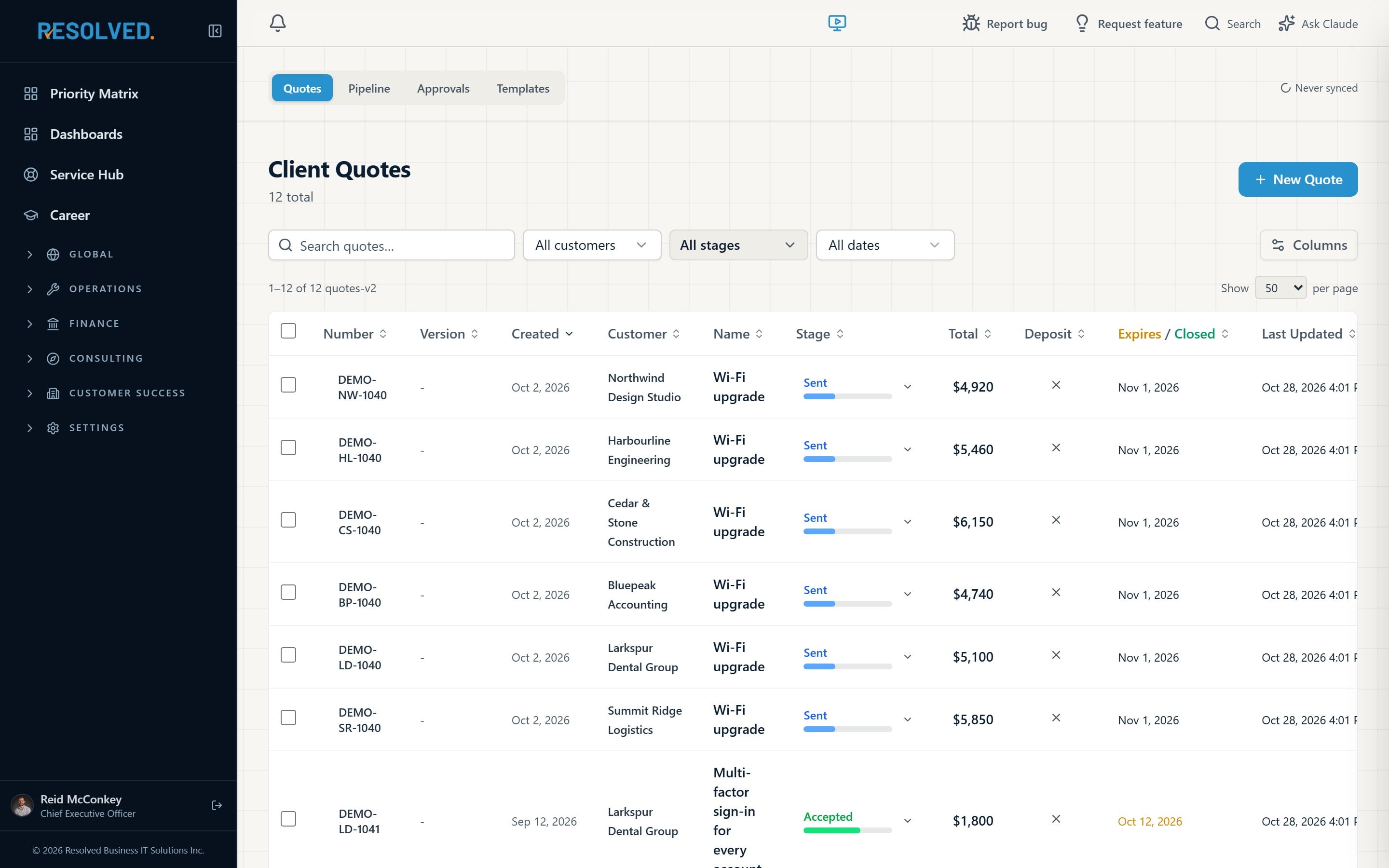
The quotes list with stages and e-signing
Quotes and e-signing. Quotes, proposals, deposits and invoices, with the client signing online. Another subscription cancelled.

Click a screen to see it full size.

The philosophy

Every MSP needs to implement AI. Most cannot afford to start with it.

A small MSP cannot put ten thousand dollars a month into an AI strategy. So do not start there. Start by cancelling the SaaS spend you do not need, with a tool you own. Then put AI on top of tools your team already uses every day.

Four objects in a row: a cancelled subscription box, a building block, a lightbulb and a price tag
1

Cancel needless SaaS spend

Replace the subscriptions that do one narrow job with modules you own. The savings start the month you switch.

2

Put every process in a module

A module, a step-by-step guide and guardrails for each process. Your team works one way, and the software keeps it that way.

3

Then add AI

Once your tools are built and your team uses them, AI has something to work with: your data, your processes, your rules.

4

Then build for your clients

Once your MSP runs on tools you built, your clients need the same thing. We teach you to run it as a line of business: work out with each client what to build, build it, implement it, support it, and keep all of that revenue.

What you get

The courses, the cohort, and our resources.

A course that takes you from your first internal tool to your first paid build for a client, and a cohort of MSP owners doing the same thing beside you.

Five people around one table, each with a laptop; one screen shows a terminal

The courses

  • How to build software for your MSP with Claude Code, starting with your first internal tool.
  • How to make it secure: sign-in, permissions, audit logs, secrets, and the review habits that keep it that way.
  • How to host it safely, and how to set up Cloudflare Zero Trust in front of it.
  • How to decide which modules to build, in what order, for your MSP, and how to strategize around that.
  • How to test each module and put guardrails on it before your team depends on it.
  • How to wind down your SaaS providers, one by one, without losing data or clients.
  • How to open a new line of business: work with a client to decide what to build, then build it, implement it and support it, owning the whole scope and all of the revenue.

The peer group

  • You join a cohort. Cohorts start each month or each quarter, depending on demand.
  • Everyone in the cohort moves through their implementation together, module by module.
  • You share modules, source code, information and habits with your cohort, and you keep talking after the course ends.
  • We give away the source code for certain modules and explain how everything works.
  • Our own resources, built at Resolved, are part of the group. We are in it to help people succeed.
TrackWhat you learnWhat you leave with
01 FoundationsClaude Code, the repo, the rules file, your first internal toolOne working tool your team uses this month
02 SecuritySign-in with your identity provider, permissions, audit logs, secrets, review habitsA security checklist you can run on every module
03 HostingWhere to run it, backups, updates, Cloudflare Zero TrustA hosted, protected app with a safety net
04 Module orderYour SaaS bill, your processes, and the order to replace themA roadmap for your MSP, with a budget
05 GuardrailsTests, step-by-step guides, and the rules that stop mistakesA module your team cannot break by accident
06 Wind-downExporting data, running both tools in parallel, cutting overYour first cancelled subscription
07 AIPutting AI on top of your own tools and dataAn AI feature your clients notice
08 Client buildsFinding what a client needs, scoping and pricing it, building, implementing and supporting itA new line of business: your first paid build for a client, owned end to end

How it works

Join the waitlist, join a cohort, build, cut over.

1

Join the waitlist

The first cohort starts January 1, 2027. Before then we confirm places with a twelve-month membership.

2

Plan

Together we pick your first module from your SaaS bill and your processes.

3

Build and test

You build it with Claude Code, with the cohort and our resources beside you.

4

Secure and host

You run it safely, behind Cloudflare Zero Trust, with backups.

5

Cancel, repeat, then build for clients

You retire the SaaS it replaced and build the next module. Then you take the same skills to your clients, as a paid service you own end to end.

Who it is for

A good fit

  • You own or lead an MSP, and you can give a few hours a week to building.
  • You pay for several SaaS tools that each do one narrow job.
  • You want AI in your business, but not a ten-thousand-dollar-a-month experiment.
  • You want to own your processes, not rent them.
  • You want a new line of business built on AI, not only a lower SaaS bill.

Not a fit

  • You want someone to build it for you. This is a course and a peer group, not a development agency.
  • You want to skip straight to building for clients. The skill comes from running your own MSP on your own tools first.
  • Nobody on your team will own the tool after the course.

Questions

What people ask first.

Do I need to be a developer?

No. You need to know your processes and your systems. Claude Code writes the code; the course teaches you how to direct it, review what it builds, and keep it safe.

Is software built this way secure enough for client data?

It is as secure as the rules you give it and the checks you run. Security is a full track of the course: sign-in with your identity provider, permissions on every action, audit logs, secrets handling, and a review habit for every change. Resolved runs its client portal this way.

Where does it run?

On a server you control, with Cloudflare Zero Trust in front of it, backups behind it, and a deploy process with a rollback. The hosting track covers all of it.

What if I only want to replace one tool?

Start there. Most members cancel one subscription in their first cohort. The order you replace the rest in is a module of the course.

Is this a new line of business?

Yes. The tools you build for your own MSP stay yours. The last track is about your clients: you work out with each client what to build, then you build it, implement it and support it, and you own the whole scope and all of that revenue. The goal is a new line of business with AI, not only a lower SaaS bill.

When does it start?

The first cohort starts on January 1, 2027. The waitlist is open now. Before the start date we contact everyone on it, in order, to confirm places.

What is the commitment?

Membership is for twelve months. That is how long it takes to build, secure and cut over a first set of modules with a cohort beside you, and it keeps the cohort together.

What does it cost?

[Price per month per MSP for the twelve-month membership.]

Join the waitlist

The first cohort starts January 1, 2027.

Join the waitlist now. Before the start date we contact everyone on it, in order, to confirm places with a twelve-month membership. No payment is taken to join the waitlist.

You can also email [contact address].